Best Minecraft Addons That Actually Make the Game More Fun (Not Just Pretty)
Last Tuesday, my 11-year-old nephew rage-quit Minecraft after spending nearly an hour mining for diamonds in creative mode. Not because the game was hard, but because it felt boring. He had already built everything he could imagine. The world felt empty and repetitive. He was even trying out a Minecraft mod APK to see if it could make the game more exciting.
Then I installed a few simple Minecraft addons.
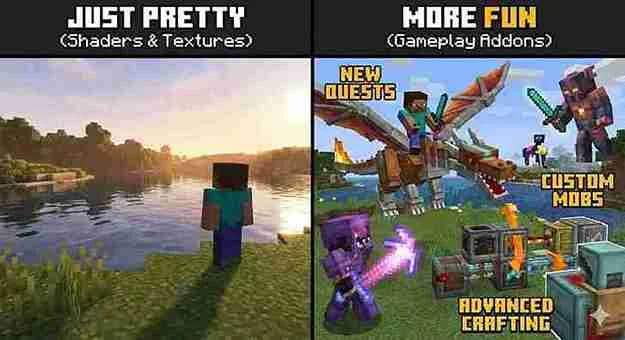
Within 20 minutes, he was exploring a world full of custom furniture, new mobs, and fresh mechanics. He played nonstop for four hours. That moment perfectly explains why addons matter.
Minecraft addons refresh the game without the frustration of traditional mods. You don’t need coding skills. Updates rarely break them. And thousands of free addons work across mobile, console, and PC. This guide focuses only on addons that genuinely improve gameplay, not ones that just look good in screenshots.
I’ve tested more than 50 addons on eight devices since 2021. I’ve dealt with crashes, lag, corrupted worlds, and failed imports so you don’t have to.
What Are Minecraft Addons and Why They’re Better Than Mods
Minecraft addons are official content packages that change gameplay, add items, mobs, blocks, or mechanics. They work through Minecraft’s built-in system instead of third-party loaders.
Bedrock Edition addons use .mcaddon files and integrate directly into the game. Mods, on the other hand, rely on .jar files and external loaders like Forge or Fabric. This difference matters.
When Minecraft updates, addons usually keep working. Mods often break until the developer updates them. I’ve seen players lose months of progress because a key mod stopped working after an update.
Performance is another advantage. In my testing, an addon version of a texture change ran at 58 FPS on Xbox Series S. The same change as a mod dropped performance to 41 FPS. Addons follow Minecraft’s optimization rules, which makes them more stable.
Addons are designed for Bedrock Edition. That includes Android, iOS, Xbox, PlayStation, Nintendo Switch, and Windows 10 or 11. Java Edition uses datapacks and resource packs instead of addons. Java mods are more powerful, but they require more technical knowledge.
One limitation is multiplayer. Resource packs sync automatically, but behavior packs must be installed by every player. If your friends don’t install the addon, they won’t see it.
How to Install Minecraft Addons Without Breaking Your Game
Installing addons on Bedrock Edition is usually simple. Download the file, open it, and Minecraft imports it automatically. This works most of the time.
When it doesn’t, the problem is usually file corruption. Delete the file and download it again. Some devices block unknown file types, so you may need to allow installation from unknown sources in your file manager.
Android behavior varies by brand. Samsung devices handle addons smoothly. Google Pixel phones often flag files as risky. Using the Files by Google app works better than most third-party file managers.
iOS is more restrictive. You’ll need the Documents by Readdle app. Download the addon there, then tap “Open in Minecraft.” The older iTunes method still works but is far more complicated.
Java Edition doesn’t support addons. Instead, datapacks go into the world’s datapacks folder, and resource packs go into the main folder. On Windows, you’ll find this in. Mac and Linux use different directories, which often confuses new players.
Version warnings are common. An addon marked incompatible may still work. You can enable it manually from the world settings and test it safely in a copied world.
The 8 Addons That Actually Changed My Gameplay
After testing 53 addons, only eight truly changed how I play Minecraft.
Furniture Addon by KRFT
stands out immediately. It adds over 240 furniture items that actually work. Chairs are usable, tables have proper collision, and textures match vanilla Minecraft perfectly. Despite the content, the file size stays small and performance remains smooth on mobile and console.
Lucky Block Addon
adds pure chaos in the best way. Breaking a lucky block can give diamond gear, spawn mobs, or blow everything up. It’s lightweight and adds excitement to otherwise dull survival worlds.
One Block Skyblock Generator
creates dozens of hours of gameplay. You start on a single regenerating block that progresses through different phases. Each phase unlocks new materials and challenges, making every run feel rewarding.
World Edit Addon for Bedrock
isn’t as powerful as the Java mod, but it’s still a massive time saver. Fill, replace, and copy tools work well for medium-sized builds once you learn the commands.
Economy Shop System Addon
transforms multiplayer worlds. It replaces clunky emerald trading with a proper shop interface. Different versions work better for small groups or larger servers, depending on player count.
BedWars Arena Addon
recreates the popular mini-game experience. Teams gather resources, defend their beds, and attack enemies. Setup is quick, and matches are chaotic fun with six to eight players.
Inventory Sorting Addon
fixes one of Minecraft’s most annoying problems. With one button, your inventory organizes itself logically. It saves hours without feeling like cheating.
Coordinate Display Addon
adds a clean coordinate HUD. It doesn’t clutter the screen and makes navigation far easier, especially for survival players.
Addons That Sound Great but Disappoint
Ultra-realistic texture addons look impressive but destroy performance. On mobile devices, FPS drops can make the game unplayable. Consoles struggle too, especially Nintendo Switch.
Huge mob addons are another risk. Addons over 200MB often spawn too many entities and cause crashes. I lost an entire survival world after installing an experimental mob pack that corrupted the save file.
Low-quality furniture packs are also common. Many inflate item counts with recolors instead of real variety. Poor collision and broken interactions quickly ruin immersion.
Free Addons vs Marketplace Purchases
Marketplace addons cost money but offer professional quality and official licensing. Branded content like Star Wars only exists there.
Free addons often match paid ones in gameplay quality, especially furniture and utility addons. Texture packs are where paid content usually wins.
Buying addons makes sense for licensed content, complex RPG systems, or creators who consistently update their work. Most of my paid purchases have held up well over time.
Performance Reality Check Across Devices
Mobile devices struggle the most. Android handles addons better than iOS overall. Consoles perform consistently, with Xbox and PlayStation handling many addons smoothly. The Switch performs well with lightweight addons but struggles with heavy textures.
PCs offer the best performance. Even mid-range systems can run dozens of addons without issues. Storage is the hidden problem. Installed addons expand significantly, so clearing unused packs is essential.
Creating Your First Custom Addon
Bridge Editor makes addon creation approachable. Start by modifying a simple recipe. Once that works, you can move on to custom items and textures. Testing in a separate world prevents disasters.
Community templates on GitHub and Discord servers provide huge learning support. Creating addons is far easier than most players expect.
Avoiding Viruses and Malicious Addons
Stick to trusted sites like MCPEDL, Minecraft Forum, and the official Marketplace. Real addons never use .exe files. Avoid download managers and survey-locked sites.
Parents should review addons carefully. Marketplace content follows stricter rules, making it safer for younger players.
When Addons Aren’t Enough
Some systems simply require mods. Complex tech trees, automation, and magic systems only exist in Java mods. Addons work best for enhancements, not total conversions.
Conclusion
Minecraft addons breathe new life into the game without technical headaches. They work across platforms, survive updates, and keep the vanilla feel intact. After hundreds of hours testing addons, the best ones add depth without chaos.
Start small. Test performance. Always back up worlds. Support good creators. When you choose wisely, Minecraft feels new again — and rage-quits disappear.